Posts

Mounting Linux NFS on solaris 10 (RPC: Program not registered and Not owner errors)

NFS server is running on Redhat Linux machine 4E IP of NFS server 192.168.1.251 share     /u01/nfs mounting the above nfs on Solaris 10  (192.168.1.119) mounting point on client /u01/nfstest mount -F nfs 192.168.1.251:/u01/nfs /nfstest the above command should mount the nfs share to /u01/nfstest on client but after i issued the command i was getting nfs mount: 192.168.1.251: : RPC: Program not registered after searching i found this link http://www.softpanorama.org/Net/Application_layer/NFS/troubleshooting_of_nfs_problems.shtml#The_program_not_registered_Error which was telling mountd deamon was not up on nfs server machine started nfs service on nfs server service nfs start after starting issued the command to mount the nfs on solaris client mount -F nfs 192.168.1.251:/u01/nfs /nfstest this time another error nfs mount: mount: /nfstest: Not owner googling taught me that this was becuase of NFS version, linux is using version 3 bu...

Keep Track Of Your Data Usage Calls and Text Messages on Android Mobiles

Your data line service provider is charging you more than you expected ! Here's the solution to keep track of your data usage , calls and text messages on Android. http://www.addictivetips.com/mobile/how-to-check-android-data-usage-stats/  I have tested this on IDEOS x5, it is running without any issues

ORA-04043: object dba_tablespaces does not exist

Image
If you try to describe any DBA_* views in mount state after opening database describing those views will give you ORA-04043 Object does not exist error. Solutions: Restart the database Flush Shared pool with "alter system flush shared_pool" References http://kr.forums.oracle.com/forums/thread.jspa?threadID=557085 metalink note  296235.1

RMAN-06136: ORACLE error from auxiliary database: ORA-01013: user requested cancel of current operation

RMAN-00571: =========================================================== RMAN-00569: =============== ERROR MESSAGE STACK FOLLOWS =============== RMAN-00571: =========================================================== RMAN-03002: failure of Duplicate Db command at 03/09/2007 12:01:22 RMAN-03015: error occurred in stored script Memory Script RMAN-06136: ORACLE error from auxiliary database: ORA-01013: user requested cancel of current operation At the end of duplication of database using rman duplicate command was giving the above error . It kept coming again and again whenever i tried to duplicate. After a search on google i found that having another session with system user will cause rman to throw this error. I found myself having another session which i used to start up database in nomount mode was still in an active state.  After closing that session and rerunning the duplicate command did the work successfully  Helpful Link http://www.orafaq.com/forum/t/7...

Configure Database Options and Delete Database option are greyed out (DBCA)

Database Configuration Assistant is not showing the database and  Configure Database Options and Delete a Database option are greyed out(disabled)  after setting up ORACLE_SID and ORACLE_HOME running dbca is not showing the database and the above options are greyed out. check the oratab file for correct entry for the database we are trying to access from dbca. Give database name and database home path in the oratab file and save it now run dbca to configure the database.

Connecting to remote host with ssh without password - By passing ssh/scp password

go to the node from where you will be connecting [ source machine ] run ssh-keygen -t dsa or ssh-keygen -t rsa this will generate public and private key when asked for file name and password just press enter so that default file will be created and password will be blank now copy the .pub content to the target machine's authorized_keys file under [username]/.ssh/ ssh-copy-id  -i [pub_file_name] [username]@[targethostname] [it will ask for password to connect to target provide password for this time] ex: ssh-copy-id  -i id_dsa.pub testuser@testserver this command will copy the public key to the target machines user's authorised_keys file location of the authorized_key file is - [user's home folder]/.ssh/ if the above command does not work copy the public key manually to target machine add the copied public key to user's authorized_key file, if it does not exist just create one ex: ssh-copy-id -i id_dsa.pub test@testserver Note: ssh-copy-id comm...

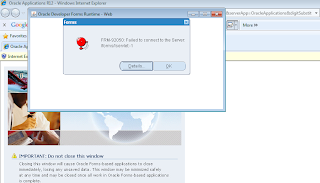
FRM-902050: Failed to connect to the server: /forms/lservlet:-1

Image
FRM-902050: Failed to connect to the server: /forms/lservlet:-1 Not able to access oracle e-business suite R12 forms from internet explorer . When any form link is clicked this error is thrown out. \ Just add the address in local intranet zone's trusted sites zone Do it this way (Internet explorer 8) Tools>Internet Options>Security>Local Intranet > Sites > Advanced > Add - "add oracle applications address here"