Posts

Physical Machine to Virtual Machine converting – Linux P2V (Unable to access resume device)
Image
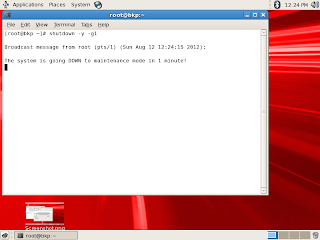
Unable to access resume device  mount: could not find file system /dev/root setuproot : error mounting /proc: No such file or directory Kernel panic - not syncing: attempted to kill init! Convert Linux Physical Machine to Virtual machine (vmware  and Virtualbox). Same procedure is working on vmware and virtual box A fine morning started with a new question in mind, what if I could convert our Linux physical server to vm. This lead me to finishing the task and documenting it. The  complete migration process of Linux physical machine to virtual machine. The following steps have been tested on oracle enterprise Linux 5. I will be sticking to OEL 5 during complete process. The process comprises of taking a backup of physical machine and restoring it on a virtual machine Back up the physical server Startup a terminal on the physical server and change to maintenance mode shutdown -y -g1 (in 1 minutes system will go to single user mode) ...

Tracing/Debugging Oracle Applications Concurrent Programmes - 11i/R12

Image
Diagnosing/Tracing Oracle Applications Concurrent Programmes 11i/R12 Simple tracing :- Creates a trace file without bind or wait (tracing without using event 10046 at level 12) Query the Concurrent programmes definition Check the Enable Trace check box Run the concurrent program using relevant responsibility Note down the concurrent request number after submitting Go to the oracle udump directory and find the trace file. Trace file names normally contain the os process id. Extended Tracing:- Creates a trace file with bind and wait (tracing with binds and waits using event 10046 at level 12) Set Profile Value at respective level  Go to the SRS screen of the respective responsibility to submit the request you want to trace Select the name of the request  Click on the debug options button (If you don’t set the profile option the debug option won’t be enabled) Clicking debug options take you to create debug rul...

The program can't start becuase MSVCR71.dll is missing from your computer Oracle Discoverer Desktop on Win 7

Image
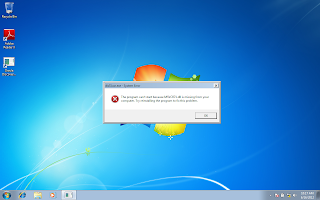
After Installing Discoverer Desktop (11.1.1.3.0) on windows 7 I got this error when i started the discoverer desktop. "The program can't start becuase MSVCR71.dll is missing from your computer. Try reinstalling the program to fix this proble" After doing a bit googling i found out the following steps will fix the issue and start Discoverer desktop normally . Dwnload MSVCR71.dll from dll-files.com website, extract it and copy the particular file to C:\Windows\System32, if you are using 64bit copy the file to C:\Windows\SysWOW64  Oracle has a support note with id 1255244.1

du and ls show different sizes for the same file

Image
du and ls show different sizes for the same file After uncompressing a file i was confused to see different sizes for the same file with du and ls command When i used du it was showing the size But ls output was showing a different size So i realized these commands works in different ways ls with option -l shows the allocated size but du shows the actual size (amount of space used). If you want to see actual size with ls use -s option. If you use this way you can see both ls and du gives same output, in this case actual size is printer first

Unable to resolve LABEL - Editing fstab from "Repair Filesystem" prompt - Openfiler (Linux)

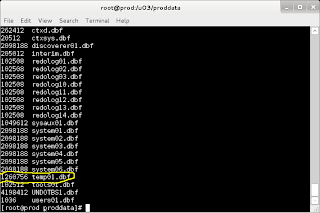
I deleted one of my partitions from my openfiler box and forgot to remove the auto boot entry from fstab. While booting the system it stops complaining unable to resolve 'LABEL=/name_of_label' . It happens sometimes we delete a partition and forget to remove automatic boot entry from fstab file. Once system is reboot it stops booting giving  unable to resolve 'LABEL=/name_of_label' message. Then system automatically asks password for maintenance, once password is supplied  a repair filesystem prompt is given . If we try to edit the fstab file in this mode system will complain 'readonly' option is set This error happens because of system trying to mount a partition with the said LABEL which is not actually available, pointing to wrong partition, etc. you can either remove the entry from fstab or you can edit fstab to correct the LABEL or partition. Use this command to remount in read/write mode and then do necessary changes in fsta...

Setting Starting Page on R12 (12.1.3)

Image
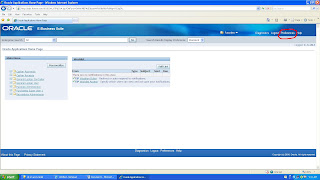
Log in and go to preferences  Go to Start Page Area  Select the Responsibility Select the page you want as starting page

APP-FND-01436: List of Values cannot find any values for you to choose error from concurrent request program parameter (R12 12.1.3)

Image
APP-FND-01436: List of Values cannot find any values for you to choose error from concurrent request program parameter After upgrading oracle application 11i(11.5.10.2) to R12(12.1.3) running concurrent program request caused this issue When concurrent program is run for a concurrent request after upgrading to R12 12.1.3 the lov, which is attached to a parameter, gives APP-FND-01436: “List of Values cannot find any values for you to choose”. When the same request is run from oracle applications 11i 11.5.10.2 the same value set is working fine. The value set is based on a table. If you go and test the value set query from the value set definition screen it returns complete successful message yet if you go to the parameter of the concurrent request program form where the particular value set is used it gives you the above error. After searching google and oracle support I found metalink note 1400963.1, EBS R12.1: Parameter for Concurrent Request Using Table Based LOV G...