Posts

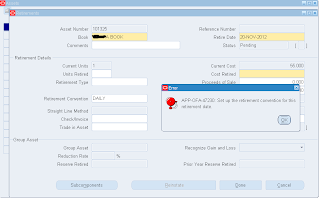
APP-OFA-47230 Set up the retirement convention for this retirement date - R12 FA

Image
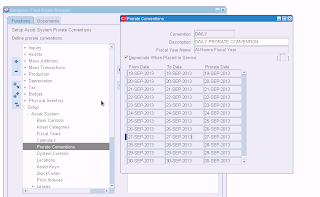
Retiring   asset showed this error “Set up the retirement convention for this retirement date” The prorate daily calendar was not entered for the current financial year, once we entered the program completed successfully

Mass Additions Post program completes with errors - Oracle R12 FA

Image
The request log show the following error message The prorate calendar and prorate convention are not set up for this date. Mass Addition ID: 12730 ==> ** Failed ** The prorate daily calendar was not entered for the current financial year, once we entered the program completed successfully

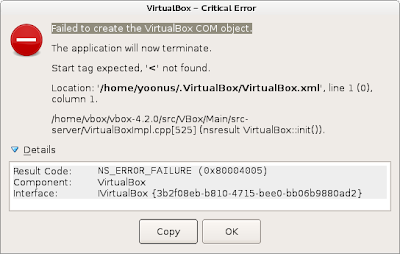
Failed to create The VirtualBox COM object

Image
Trying to start virtual box ended up giving this error on fedora 17. There is a file called VirtualBox.xml in the location cd [home_dir]/ .VirtualBox.xml In the same location there is another file called VirtualBox.xml-prev which is kind of backup of the VirtualBox.xml.  I just renamed the  VirtualBox.xml to something and made a new copy of VirtualBox.xml-prev with the name VirtualBox.xml. This just fixed the issue and i can start virtual box now :)

Setting default template for concurrent requests with xml reports oracle R12

Image
Setting default template for concurrent requests with xml reports   Go to System Administrator > System Administration > Concurrent > Programs Enter the name of the concurrent program and click go Click the Update Go to Onsite Setting Tab Select the template you want to default from the template list box

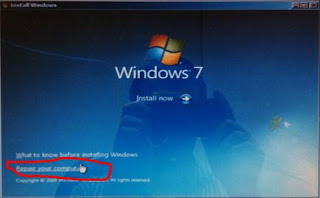
Fixing Grub 2 dual boot issue with windows 7 - Fedora 17

Image
Pc is configured dual boot with windows 7 and fedora 17.   Windows boot manger got corrupted and unable to boot. Grub2 boot loader comes up with windows 7 boot entry but selecting to boot to windows 7 started giving boot mgr error. I fixed windows boot issue first with win 7 cd then reinstalled grub2 using Fedora 17 live cd Fix windows 7 boot mgr Use windows 7 installation cd to fix the win 7 boot issue Boot from the windows 7 cd Repair Your Computer Select User Recovery tools Startup Repair This will find the installed windows and fix windows 7 boot issue. Windows 7 will erase grub 2 boot loader and install windows 7 boot manager so we will not be able to access  fedora. Now we have to install grub again to be able to dual boot properly. 2. Reconfigure Grub 2 for dual boot Start the pc with fedora 17 live cd Start a terminal Change user to root su - root Mount the root partition moun...

Physical Machine to Virtual Machine converting – Linux P2V (Unable to access resume device)

Image
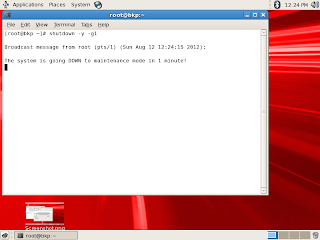
Unable to access resume device  mount: could not find file system /dev/root setuproot : error mounting /proc: No such file or directory Kernel panic - not syncing: attempted to kill init! Convert Linux Physical Machine to Virtual machine (vmware  and Virtualbox). Same procedure is working on vmware and virtual box A fine morning started with a new question in mind, what if I could convert our Linux physical server to vm. This lead me to finishing the task and documenting it. The  complete migration process of Linux physical machine to virtual machine. The following steps have been tested on oracle enterprise Linux 5. I will be sticking to OEL 5 during complete process. The process comprises of taking a backup of physical machine and restoring it on a virtual machine Back up the physical server Startup a terminal on the physical server and change to maintenance mode shutdown -y -g1 (in 1 minutes system will go to single user mode) ...
Tracing/Debugging Oracle Applications Concurrent Programmes - 11i/R12

Image
Diagnosing/Tracing Oracle Applications Concurrent Programmes 11i/R12 Simple tracing :- Creates a trace file without bind or wait (tracing without using event 10046 at level 12) Query the Concurrent programmes definition Check the Enable Trace check box Run the concurrent program using relevant responsibility Note down the concurrent request number after submitting Go to the oracle udump directory and find the trace file. Trace file names normally contain the os process id. Extended Tracing:- Creates a trace file with bind and wait (tracing with binds and waits using event 10046 at level 12) Set Profile Value at respective level  Go to the SRS screen of the respective responsibility to submit the request you want to trace Select the name of the request  Click on the debug options button (If you don’t set the profile option the debug option won’t be enabled) Clicking debug options take you to create debug rul...