Posts

Restoring autoconfig configurations (How does autoconfig restore.sh script work)
Image
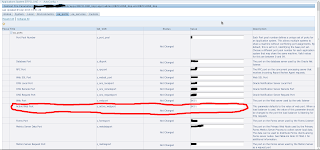
Each time autoconfig is run it creates a folder under [inst_top]/admin/out/ . The name of folder is the the date and time of autoconfig run in the mmddhhmi format , This contains resote.sh script with many other files including  context_file. On running autoconfig it automatically creates a folder with different files for that autoconfig run. After autoconfig run If you find something wrong( like application is not accessible because of last modification) stop the application tier services and go to the relevant autoconfig folder and run restore.sh script to restore previous autoconfig configuration. The restore.sh will not actually restore the context_file but this will restore all the settings prior to this autoconfig run.(if you had a faulty configuration before, of course restore.sh will restore only those configurations) After restore.sh is run start up the services(don't run autoconfig), access the application, check the modifications and correct the modifications caus...
Recovering database past controlfile SCN

Scenario Restore the database and recover up to the last available archived log sequence.Auto Controlfile backup is generated before sometime disaster happened (lost all controlfiles, datafiles and redologfiles).After the autobackup of controlfile generation there had been few archive logs generated but not backed up.  Steps Restore the controlfile Restore the datafiles Catalogue the archived logs manually of which controlfile is not aware of recover the database open the database with resetlogs Connect to rman and set dbid RMAN> restore controlfile from '/u02/bkp/TESTCLONE/bkpcontrl_c-1057140170-20130324-01' Starting restore at 25-MAR-2013 14:32:10 allocated channel: ORA_DISK_1 channel ORA_DISK_1: SID=358 device type=DISK channel ORA_DISK_1: restoring control file channel ORA_DISK_1: restore complete, elapsed time: 00:00:01 output file name=/u04/oracle/TESTclonedata/cntrl01.dbf output file name=/u04/oracle/TESTclonedata/cntrl02...

Restoring Database to a new location using rman

Scenario All database files got lost (controlfiles,redo,datafiles), server parameter files is also lost (spfile). The database has to be restored meeting the following conditions After restoring all database files(controlfiles, redolog, datafiles) should have new location Spfile will be residing at  same location. Environment Oracle database 11.2.0.1.0 OEL 5.7 Before Disaster Database files (datafiles,controlfiles,redo) /u01/app/oracle/oradata/orcl spfil $ORACLE_HOME/dbs archive log location /u01/oracle/arch backup controlfile location -/u01/app/oracle/ controlfile autobackup is turned on After recovery spfile same location ($ORACLE_HOME/dbs) databasfiles and controlfiles /u01/oracle/oradata/orcl archive log location /u01/oracle/arch There is a controlfile autobackup and database backup taken sometime before disaster. Restoring and recovering Create new directory structures           cd /u01/oracle     ...

When Controlfile Autobackup is generated, Why autobackup controlfile is not generated

Database Backup and Recovery User's Guide says 'The autobackup occurs whenever a backup record is added. If the database runs in ARCHIVELOG mode, then an autobackup is also taken whenever the database structure metadata in the control file changes " http://docs.oracle.com/cd/E25178_01/backup.1111/e10642/rcmconfb.htm#i1017907 Out of curiosity to see how exactly it works,  just added a tablespace and checked my control file autobackup location to see the auto generated backup of controlfile. When i did 'ls' it was not showing any recent controlfile autobackups. I rechecked all my configuration to make sure all setup is done right. After about 10 minutes i listed again  autobackup location, now i can see a new autobackup file is generated. I spent sometime searching on google to see how long it takes and if the time it takes is configurable. I did not get much on its time lag . Spending sometime on MOS searching for auto controlfile backup generation time ...

Archive log destination without setting any of Log Archive or recovery parameters

Database  - 11.2.0.1.0 I was wondering how 'archive log list' is showing an archive log destination  without setting any of relevant archive log destination or db recovery parameters. LOG_ARCHIVE_DEST LOG_ARCHIVE_DEST_n DB_RECOVERY_FILE_DEST SQL> archive log list ; Database log mode No Archive Mode Automatic archival Disabled Archive destination /u01/app/oracle/product/11.2.0/dbhome_1/dbs/arch Oldest online log sequence 8 Current log sequence 10 SQL> show parameter log_archive_dest; NAME TYPE VALUE ------------------------------------ ----------- ------------------------------ log_archive_dest string log_archive_dest_1 string SQL> show parameter db_recovery NAME TYPE VALUE ...

Primary Key and Foreign Key on Char field (ORA-02291: integrity constraint)

I have tables a and b with character field as its primary key foreign key relation. The primary key field is with char(5) and foreign key field is with char(50). When I tried to insert to child table selecting from primary key column i get "ORA-02291". After giving little rest to brain I figured out whats going wrong. When insert is fired to column with char data type of child table, oracle is appending spaces on top of the value coming from primary key column (because its a char field!!!) . So primary key column value + spaces to fill the character field that makes the child a different value, that's the reason for ORA-02291. This is how it works SQL> create table a(id number,rel char(5)) ; Table created. SQL> create table b(id number,rel char(5)) ; Table created. SQL> create table c(id number,rel char(50)) ; Table created. SQL> alter table a add(constraint a_pk primary key (rel)); Table altered. SQL> alter table b add(c...

Void option on Payment actions screen is disabled while trying to void a payment.

Image
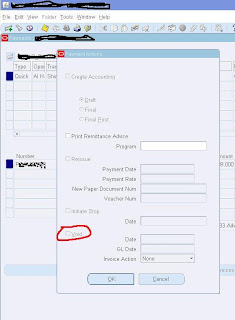
Void option on Payment actions screen is disabled while trying to void a payment. Oracle application R12(12.1.3) The payment is done for a prepayment and the prepayment is already applied to a standard invoice. Oracle actually restrict voiding a payment for a prepayment already   applied to an invoice To void the payment  Go to prepayment applications and unapply any invoices applied Query for the invoice to which you have applied the prepayment (now the invoice should have new distribution line and status must have changed to ‘Needs revalidation’) Validate the invoice and create accounting Go back to payment screen and query the payment you want to void Click the Actions Button Void check box should be enabled now