Posts

GLOBAL_NAMES Parameter and its impact on oracle database (ORA-02085)

      Remote database name: UPGR (database link is made to connect to this database) On Local database  set the parameter global_names  This will make sure that connection to remote db is allowed only if db link name match with global_name of remote database show parameter global_names                         boolean     TRUE Get global name from remote database select * from global_name; GLOBAL_NAME ----------------------- UPGR Create a test database link on the local database with any name and test Create a database link with any name create database link  a   connect to  test identified by ***  using 'tst:1521/UPGR' ; Database link created. SQL> select * from a@ a ; select * from a@a                 * ERROR at line 1: ORA-0...
Sending email with UTL_MAIL fails(ORA-24247) when call is made from a procedure.

  Sending email with UTL_MAIL fails(ORA-24247) when call is made from a procedure. 24247. 00000 -    "network access denied by access control list (ACL)" SHOW parameter smtp NAME             TYPE    VALUE                                         --------------- ------ -------------------------------------------- smtp_out_server string ficticious.com   sending emails with UTL_MAIL.send_attach_varchar2 is working perfectly fine, but wrapping UTL_MAIL.send_attach_varchar2 in a procedure compiles successfully but executing the procedure ends up in ORA-24247 error. Wrapper procedure for UTL_MAIL.send_attach_varchar2 create or replace procedure        snd_email_atch is ...

Autoupgrade Error: UPG-1401, ORA-38760 due to guaranteed restore point

Image
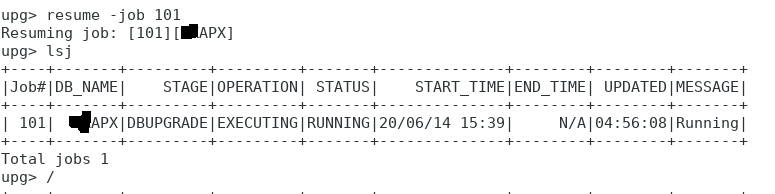
In the middle of 11.2.0.4 upgrade to 19c with auto upgrade i deleted flash back log files due to space constraints. Forgot to include parameter ( apx .restoration=no )  to instruct autoupgrade utility not to do a guaranteed restore point. Autoupgrade had following error upg>  ------------------------------------------------- Errors in database [APX] Stage     [DBUPGRADE] Operation [STOPPED] Status    [ERROR] Info    [ Error: UPG-1401 Opening Database APX in upgrade mode failed Cause: Opening database for upgrade in the target home failed. For further details, see the log file located at /home/oracle/APX/APX/101/autoupgrade_20200614_user.log] ------------------------------------------------- Logs: [/home/oracle/APX/APX/101/autoupgrade_20200614_user.log] autoupgrade_20200614_user.log had this detailed error 2020-06-14 21:02:52.419 ERROR  DATABASE NAME: APX       ...

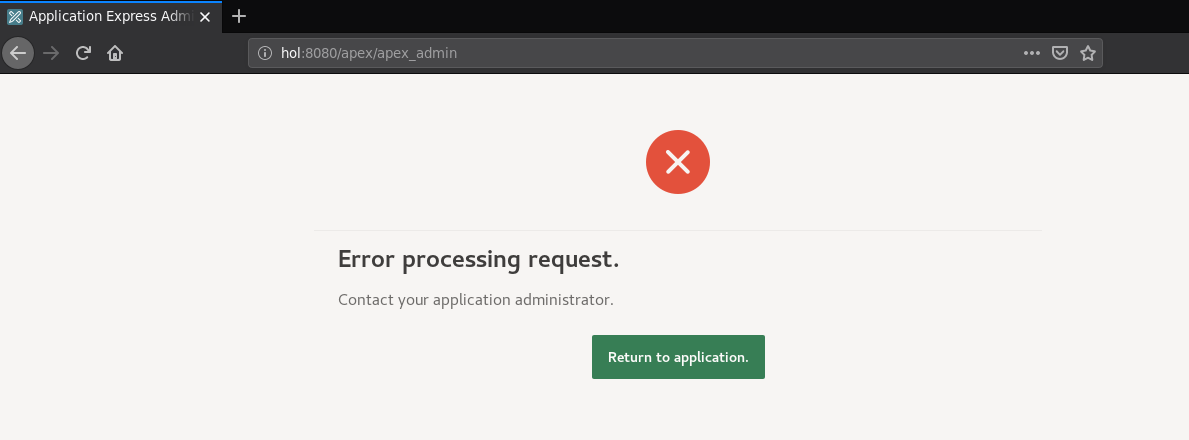
Error processing request - Contact your application administrator apex 20.1

Image
After upgrading 11.2.0.4 to 19c with apex 20.1 accessing apex_admin/apex pages was throwing “Error processing request” Contact your application administrator. There were three invalid objects for APEX_200100 WWV_FLOW_SESSION_RAS WWV_FLOW_WIZARD_API WWV_FLOW_DATA_LOADER Tried compiling these objects but compile was completing with PL/SQL: ORA-00942: table or view does not exist To resolve the issue following rant needs to be given then compile (ran both grant and compile as sysdba) grant select on SYS.DBA_XS_DYNAMIC_ROLES to APEX_200100; grant select on SYS.DBA_TAB_IDENTITY_COLS to APEX_200100; alter package APEX_200100.WWV_FLOW_SESSION_RAS compile body; alter package APEX_200100.WWV_FLOW_WIZARD_API compile body; alter package APEX_200100.WWV_FLOW_DATA_LOADER compile body; Returned 0 invalid object for APEX_200100  select * from dba_objects where status = 'INVALID' and owner = 'APEX_200100' ; Now both admin and apex pages ar...

Oracle E-Business Suite Virtual Appliance 2.2.7 Configuring on Windows host

oracle e-business suite 12.2 virtual appliance on Windows host after downloading required zip files  we need to run assemble.sh script to prepare the final virtual box image (ova) on Linux environment its easy to follow the read me and run assemble.sh script. Unfortunately this time i was windows for testing. To our rescue we have cygwin on windows !!! Install cygwin and make sure you are installing unzip as well with cygwin run assemble.sh if its complaining about checksum jst check newly generated checksum file and oracle provided checksum file. md5sum did not match In my case i found that 666ec13b1bcd9c4517ab2b9ce2dfae1b *V974693-01_1of2.zip a * was prefixed to the file name which was actually causing the error , i manually verified all checksum values from md5sumwhenshipped.txt to sitemd5sum.txt  and found all values were same but a "*" was added to sitemd5sum.txt file I replaced the * with space and saved the file commented the part in ...

PatchWizard - Analyze Specific Patches completes with Error R12 RPC3

Image
EBS : 12.1.3 DB   :  11.2.0.3 Analyzing RPC3(20203366) patch kept completing with status Error  I was trying to analyze RPC3 patch with patchwizard " Analyze Specific Patches" option. Downloaded the patch to patch staging area and and submitted for patch analysis with "Analyze Specific Patches" option zip files 1 through 7  p20203366_12.1.0_R12_LINUX_* were available in the patch stage directory /u01/oracle/patches Main request error The set completed normally with outcome Error. The outcome was determined by the stage Submit Patch Download, Upload & Analysis Request (3). Sub request Sub Request Logfile has these contents Downloading patches for bug: 20203366 ---------------------------- User has not specified any codeline for the patch 20203366 Found the following patch(es) on metalink: Branchline: p20203366_12.1.0_R12_LINUX_7of7.zip Customer's onsite codeline (AU) : 1  Customer's codeline does...
Image
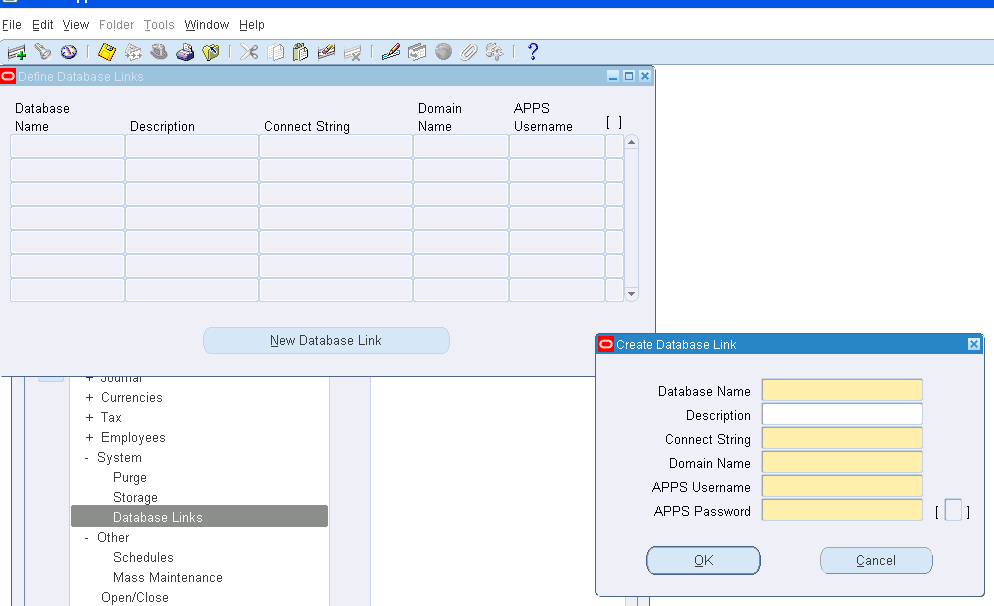
Transferring  FSG from one instance to another Transferring FSG from once instance to another is very easy using seeded  'Program - FSG Transfer' concurrent program. There are two steps involved  1. Create a database link(db link that connects to source) in the target instance 2. Run Program - FSG Transfer Creating Database link On the target instance create a database link to connect to source instance. It can be created using Database Links screen under General Ledger Controller  Responsibility General Ledger > Setup>System>Database Links Database Name : Name of the Source Database Description: Description to understand what this dblink is for Connect String: Different methods can be used to connect to source database like Esyconnect/connection descriptor/Service name alias Example using different methods By using Connect Descriptor (DESCRIPTION=(ADDRESS=(PROTOCOL=tcp)(HOST=vmprod.test.com)(PO...