Posts

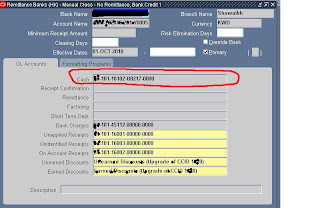
Receipt account is created with wrong cash account – updating receipt class bank account cash field
Image
Bank account for receiving was created with wrong cash account. To resolve this issue there is no way to update cash account of bank account field in receipt class Receivables > Setup > Receipt Classes > Bank Accounts oracle suggested solution to use this account again in receipt is to create a new calss with proper accounts. oracle doc ID = 1234022.1 End date the bank account in receivables classes (the account which is entered with wrong cash account). create a new class Add the bank accoun in the newly created class take care for the effective dates of both classes and accounts. For account classes the effective date from can not be updated, it has to be deleted and recreated. The account can only be deleted if there is no related transactions

excell,word and other programmes are not displaying charecters properly (Change the system locale )

Change the system locale charecters for languages like arabic wont open properly. A csv file with arabic name list is opened in excel but excel is showing as junk charecters. change the charecter set to your locale  control paner > Regional and Language options > Administrative >change system locale Select the system locale you want and click ok The system will restart with newly selected language http://windows.microsoft.com/en-US/windows-vista/Change-the-system-locale

FTP Client Access from an ISA Server Network

The error below were thrown out whenever we try to connect to an ftp site from our windows xp clients. Our clients are configured to access internet through ISA 200 "200 PORT command successful. Consider using PASV" Solution Article ID: 300641 - Last Review: May 24, 2010 - Revision: 8.0 http://support.microsoft.com/Default.aspx?kbid=300641 Related reads http://technet.microsoft.com/en-us/library/bb794745.aspx (Troubleshooting Outbound FTP Access in ISA Server) http://technet.microsoft.com/en-us/library/cc750609.aspx (FTP Client Access from an ISA Server Network)

Uninstalling VMware products from Linux

To uninstall vmware products from linux use vmware-installer script. Go to > /usr/bin the file is located there linux # vmware-installer     -u       ex: to uninstall vmware-workstation linux #    vmware-installer -u vmware-workstation

Network Manager icon is not appearing on desktop after opensuse 11.4 installation

the icon for network manager is not appearing on panel. this is becuase by default network is managed with traditional method with ifup, to change this we have to change it to user controlled network manager Step s go to yast > Network Devices > Network Settings > Global options select User controlled with NetworkManager by default traditional method with ifup is selected once you did that network manager icon will be added to panel, now you can set up your network using this from your desktop

Installing nvdia driver on linux

Downolad nvidia driver from nvdia website stop xserver to do this restart with init 3 or edit /etc/inittab file to change runlevel to 3 then restart if nouveau driver is used nvida will detect (we can manually disable this refer nvidia readme) this at installation and add an entry in /etc/modprobe.d/nvidia-installer-disable-nouveau.conf the entries in the file will be blacklist nouveau options nouveau modeset=0 this will disable nouveau but if os is taking  this at boot level this wont be enough to disable, to disable this at boot level we have to edit boot configuration file to add an entry there or at the time of booting press e and go to kernel line and add this at the end rdblacklist=nouveau this will disable nouveau at boot level also go to /etc/Xorg and take a back up of xorg.conf file (incase if installation fails we can just restore and bring back the system to old condition) now go to the folder where nvdia driver is stored and run sh nvdia instal...

Creating a database link to access objects on a remote database

1. service name in tnsname 2. create a database link on the local database 3.connect using this database link to remote database Service Name To create a database link that points to a remote database you should have proper service name entry in local computer's tnsnames.ora file Adding service name details in the tnsnames file to access remote database (if this is already existing ignore it) ex: tns entry to connect to a remote database running on testserver using service name 'test' test = (DESCRIPTION = (ADDRESS_LIST = (ADDRESS = (PROTOCOL = TCP)(HOST = testserver)(PORT = 1522)) ) (CONNECT_DATA = (SERVER = DEDICATED) (SERVICE_NAME = test) ) ) create database link on the local database (the database from which you are trying to access another database) Syntax: create database link link_name connect to user_name identified by password using service_name link_name = this is the name for the database link username = us...